Backup and Disaster Recovery
Introduction
This document outlines strategies for backup, recovery and DR, as it pertains to the ESP server application. These suggestions can be implemented to achieve highly available (HA) infrastructure as well as help inform decisions when performing risk analysis related to your own internal business continuity (BC) guidelines and policies.
Risk Analysis
Determining the correct level of redundancy, HA, and backups should be defined by internal IT/DevOps/Business policies and processes to determine RTO (Recovery Time Objective) and RPO (Recovery Point Objective) values to meet any organizational defined SLO (Service Level Objective). One possible decision factor is the cost of implementing redundancy or HA versus lost revenue, reputation, and internal staff time associated with downtime.
Backup
Recommendations and examples
Always back up the database first, followed by the shared data volume (/opt/l7esp/data). The reason is explained in How the database and the data volume relate below: the data volume is effectively append-only, so a data volume copy taken after the database copy contains every file the database copy references. A data volume copy taken before the database copy does not, and restoring that pair produces database records that point at files that do not exist.
At minimum L7 recommends whether performing a “hot” or “cold” backup:
Keep copies of each deployment bundle that you deploy, since these contain information about the version of the software, as well as the configuration that was applied.
Using
pg_dump --format="c"for PostgreSQL database backups so you may be able to restore the backups with thepg_restorecommand. If you prefer to create backups in a different format with thepg_dumpcommand, note that you will likely have to pipe the backup file into thepsqlPostgreSQL command-line utility to perform a restore.If the data volume exists outside of the default location (e.g. NFS/EFS mount) this should be backed up as well.
Backup the deployed installation tarball to be able to reinstall if required.
One example of a backup strategy is to first backup the database to the shared data volume, then perform a backup of the data volume which will always result in atomic backups.
An option for AWS provisioned environments is the use of a managed service such as AWS Backup, which offers the following features:
Centralized backup management
Policy-based backup solution
Tag-based backup policies
Automated backup scheduling
Automated retention management
Backup activity monitoring
Lifecycle management policies
Incremental backups
Backup data encryption
Backup access policies
Amazon EC2 instance backups
Item-level recovery for Amazon EFS
Cross-region backup
Cross-account backup
One thing to keep in mind when utilizing a managed service to perform a “hot backup” is that the database backup (e.g. an RDS or Azure Database for PostgreSQL snapshot) must occur before the data volume backup (e.g. an EBS, EFS, Azure Files or NFS snapshot) to provide a valid restore point.
It is also highly recommended to regularly audit and test your backup/restore strategy to ensure it can be performed successfully as well as complies with any organizational policies and regulatory controls.
Common disaster-recovery instance requirements
The disaster-recovery installation must have the same product version and patch level as the production installation.
If any configuration or file changes (such as applying patches) are made to the production instance, the same changes must be repeated on the disaster-recovery instance.
As the production system is used, all data changes must be replicated to the disaster-recovery instance. These changes can be database changes or file system changes, depending on the product in use.
Replicating data changes imposes additional demands on the resources in the production system. To keep these demands to a minimum, the replication schedule should be carefully considered. If continuous replication is needed, the production system must be given additional resources (CPU and memory) to reduce the performance impact.
Restore
How the database and the data volume relate
The database holds every record, including each file’s path on disk. The data volume (/opt/l7esp/data, on whatever storage backs it) holds the files themselves, under files/ and pipeline/. L7|ESP only ever adds to the volume: deletes are soft, and nothing removes bytes.
A file on the volume with no record is harmless. It is unreachable through L7|ESP.
A record whose file is missing is a real problem: it is visible in L7|ESP and downloading it fails. It means the database is newer than the volume.
Important
The database point in time must be at or before the data volume point in time.
That is why the database is backed up first and the volume second, and why a restore must not leave the database newer than the volume.
Restore scenarios
Database lost, volume intact. The usual case with a managed database. Restore the database to the latest point available and do not touch the volume. Anything added between the restore point and the failure is now an orphan on the volume, which is harmless.
Volume lost, and every record must have its file. Restore the volume from the newest snapshot, then restore the database to a point at or before that snapshot’s timestamp. Everything after the snapshot is lost from both stores, so the volume’s snapshot interval is the loss window for the whole system in this case.
Volume lost, and the process data matters more than the files. Restore the volume from the newest snapshot and leave the database at its latest point. Samples, workflow steps and audit entries from the gap are preserved. Downloads of files created in the gap fail. This is a deliberate exception to the rule above; the reconciliation below lists exactly which files are missing.
Reconciling the database and the data volume
After any restore, check whether the database and the volume agree. esp-data-reconcile in /opt/l7esp/server/bin (L7|ESP 2026.1 and later) does this. It only reads. Inside the container it needs no arguments:
esp-data-reconcile --help
On an older release, fetch the same file from this site into the container’s bin directory once; it only needs the click and psycopg2 packages, which every L7|ESP release already includes, so this works on air-gapped installs:
curl --fail --silent --show-error --output /opt/l7esp/server/bin/esp-data-reconcile \
    https://cdn.l7esp.com/docs/sdk/2027.1/_static/esp-data-reconcile
chmod +x /opt/l7esp/server/bin/esp-data-reconcile
The shebang names /usr/local/bin/python, the interpreter that carries L7|ESP’s own packages in every image from 3.3 on. The 3.2 image installed Python from Debian instead, so on 3.2 only, run it as:
/usr/bin/python3 /opt/l7esp/server/bin/esp-data-reconcile --help
Files with no database record (orphans). Every file under files/ whose uuid is not in the database, and every run directory under pipeline/ not referenced by a pipeline instance:
esp-data-reconcile orphans --output orphans.tsv
Quarantine orphans (move them to a dated directory outside files/) rather than delete them. A user may want the original back.
Database records with no file (dangling references). Every file record and pipeline instance whose recorded path does not exist on the volume. Soft-deleted records are skipped unless --include-archived is given:
esp-data-reconcile dangling --output dangling.tsv
Both commands accept --scope files or --scope pipeline to limit the report to one directory. Exit status is 0 for nothing found, 1 for something found, 2 for a bad invocation, and 3 when the report could not run (for example, an unreachable database), so a runbook can tell a finding from a failure.
If the consistency rule was followed, dangling reports nothing. If it reports records, the database is newer than the volume: use an older database or a newer volume, or, in the third scenario above, this is the list of what is missing.
Run this before reopening the system to users, and keep the reports with the incident record.
Source of esp-data-reconcile (also available for download)
  1#!/usr/local/bin/python
  2# /// script
  3# requires-python = ">=3.9"
  4# dependencies = [
  5#     "click",
  6#     "psycopg2-binary",
  7# ]
  8# ///
  9"""Reconcile the L7|ESP database against the data volume after a restore.
 10
 11Two reports, both read-only:
 12
 13\b
 14  orphans   files and pipeline run directories on the data volume
 15            with no record in the database
 16  dangling  database records whose file or pipeline run directory
 17            is missing from the data volume
 18
 19Neither command modifies the database or the data volume. Quarantining or
 20recovering files is a separate, deliberate step.
 21
 22Inside an L7|ESP container this runs with no arguments: the data directory
 23comes from LAB7DATA and the database connection from L7ESP_DATABASE_URL or
 24the libpq PG* environment variables. Elsewhere, pass --data-dir and
 25--database-url (or set DATABASE_URL).
 26
 27Exit codes distinguish the three outcomes a runbook has to tell apart:
 28
 29\b
 30  0  the report ran and found nothing
 31  1  the report ran and found something
 32  2  the invocation was wrong, e.g. a --data-dir that is not a data volume
 33  3  the report could not run, e.g. an unreachable database
 34"""
 35
 36from contextlib import contextmanager
 37from datetime import datetime
 38from datetime import timezone
 39from os import environ
 40from os import lstat
 41from os import scandir
 42from os.path import normpath
 43from pathlib import Path
 44from re import IGNORECASE
 45from re import compile as compile_re
 46from sys import exit as sys_exit
 47from typing import Any
 48from typing import Iterable
 49from typing import Iterator
 50from typing import List
 51from typing import NamedTuple
 52from typing import Optional
 53from typing import Set
 54from typing import Tuple
 55
 56from click import Choice
 57from click import ClickException
 58from click import Path as PathType
 59from click import UsageError
 60from click import echo
 61from click import group
 62from click import option
 63from psycopg2 import Error as PsycopgError
 64from psycopg2 import connect
 65from psycopg2.extensions import ISOLATION_LEVEL_REPEATABLE_READ
 66
 67Row = Tuple[str, str, str]
 68
 69UUID_SUFFIX = compile_re(r"\.([0-9a-f]{8}-[0-9a-f]{4}-[0-9a-f]{4}-[0-9a-f]{4}-[0-9a-f]{12})$", IGNORECASE)
 70
 71FILE_RECORDS_SQL = """
 72SELECT r.uuid::text, r.name, f.file_url, r.archived
 73FROM resource r
 74JOIN lab7_file f ON f.lab7_file_id = r.resource_id
 75"""
 76
 77PIPELINE_RUNS_SQL = """
 78SELECT r.uuid::text, r.name, r.meta->>'pi_dir', r.archived
 79FROM resource r
 80JOIN task_instance t ON t.instance_id = r.resource_id
 81WHERE r.meta ? 'pi_dir'
 82"""
 83
 84# L7|ESP writes this file into the data directory when it first creates the
 85# database tables: a uuid4 plus a newline, mode 0444. Its presence is what
 86# separates an initialized data volume from an empty directory or a wrong path.
 87SITE_ID_FILE = "site_id.txt"
 88
 89
 90class CheckAborted(ClickException):
 91    """The report could not be produced, so its result carries no information.
 92
 93    Distinct from finding nothing, which is a real answer. Exits 3 so a runbook
 94    never reads a failed connection or an unreadable volume as a clean bill of
 95    health, and never reads it as a finding either.
 96    """
 97
 98    exit_code = 3
 99
100
101class DanglingReport(NamedTuple):
102    """Missing-path rows, plus counts of the records that could not be checked."""
103
104    rows: List[Row]
105    pathless: int
106
107
108# --- Environment defaults ---
109
110
111def default_data_dir() -> Path:
112    """LAB7DATA inside a container, /opt/l7esp/data otherwise."""
113    return Path(environ.get("LAB7DATA", "/opt/l7esp/data"))
114
115
116def default_database_url() -> str:
117    """DATABASE_URL, then L7ESP_DATABASE_URL, then libpq's PG* variables."""
118    return environ.get("DATABASE_URL") or environ.get("L7ESP_DATABASE_URL") or ""
119
120
121def database_url_source(database_url: str) -> str:
122    """Name where the connection settings came from, without echoing them.
123
124    A failed connection has to say which configuration to go and look at, but
125    the URL itself routinely carries a password, so only its origin is named.
126    """
127    if not database_url:
128        return "the libpq environment variables (PGHOST, PGDATABASE, ...) or their defaults"
129    if database_url == environ.get("DATABASE_URL"):
130        return "$DATABASE_URL"
131    if database_url == environ.get("L7ESP_DATABASE_URL"):
132        return "$L7ESP_DATABASE_URL"
133    return "--database-url"
134
135
136# --- Business logic ---
137
138
139def canonical(path: Path) -> Path:
140    """Collapse redundant separators and up-level references in a path.
141
142    Applied to both sides of every disk-against-database comparison so the two
143    are normalized the same way. Deliberately does not resolve symlinks: that
144    reads the filesystem, and would answer differently for a path the database
145    recorded than for the same path found on disk.
146    """
147    return Path(normpath(str(path)))
148
149
150def require_data_volume(data_dir: Path) -> None:
151    """Refuse to run unless data_dir really is an L7|ESP data volume.
152
153    Catches a wrong or empty --data-dir.
154    """
155    if (data_dir / SITE_ID_FILE).is_file():
156        return
157    raise UsageError(
158        "{0} does not look like an L7|ESP data volume: no {1}.\n"
159        "L7|ESP writes that file when it initializes the database, so every\n"
160        "restored volume has one. Inside an L7|ESP container the default comes\n"
161        "from LAB7DATA and needs no flag; elsewhere point --data-dir at the\n"
162        "directory that holds files/ and pipeline/.".format(data_dir, SITE_ID_FILE)
163    )
164
165
166def walk_files(files_dir: Path) -> Iterator[Path]:
167    """Yield every file under the files/ directory, symlinks included.
168
169    A missing directory yields nothing rather than raising: an install that has
170    never taken an upload has no files/, and that is not an error. Symlinks are
171    reported by name but never followed, so a link out of the volume or back
172    into it cannot send the walk somewhere else or around a loop.
173
174    Each directory is closed before descending into its children, so the walk
175    holds one handle at a time rather than one per level.
176    """
177    if not files_dir.is_dir():
178        return
179    subdirs: List[Path] = []
180    try:
181        with scandir(files_dir) as entries:
182            for entry in entries:
183                if entry.is_symlink() or not entry.is_dir(follow_symlinks=False):
184                    yield Path(entry.path)
185                else:
186                    subdirs.append(Path(entry.path))
187    except OSError as exc:
188        raise CheckAborted(
189            "could not read {0}: {1}.\n"
190            "A partial walk would under-report orphans while looking complete, "
191            "so nothing is reported.".format(files_dir, exc.strerror or exc)
192        )
193    for subdir in subdirs:
194        for path in walk_files(subdir):
195            yield path
196
197
198def uuid_of(path: Path) -> Optional[str]:
199    """Return the uuid suffix of a file name, or None if it has none.
200
201    Lower-cased to match PostgreSQL's rendering of a uuid column, so a name
202    written in upper case still reconciles against its record.
203    """
204    match = UUID_SUFFIX.search(path.name)
205    return match.group(1).lower() if match else None
206
207
208def mtime_of(path: Path) -> Optional[str]:
209    """The entry's own modification time as an ISO 8601 UTC string.
210
211    Returns None if the entry is gone, which happens when a file is deleted
212    between the walk and this call; it is no longer an orphan, so its row is
213    dropped rather than aborting the whole report. Does not follow symlinks:
214    the question is what sits on this volume, not what it points at.
215    """
216    try:
217        return datetime.fromtimestamp(lstat(path).st_mtime, tz=timezone.utc).isoformat()
218    except OSError:
219        return None
220
221
222@contextmanager
223def read_only_connection(database_url: str) -> Iterator[Any]:
224    """A single repeatable-read, read-only transaction for one command's queries.
225
226    One connection, so both queries of a command see the same snapshot and the
227    two reports cannot disagree about a row written between them. Read-only and
228    repeatable-read are set on the session, so the guarantee that this tool
229    changes nothing is enforced by the server rather than promised by the code.
230    """
231    try:
232        conn = connect(database_url)
233    except PsycopgError as exc:
234        raise CheckAborted(
235            "could not connect to the L7|ESP database, so nothing was checked.\n"
236            "{0}\n"
237            "Connection settings came from {1}.".format(str(exc).strip(), database_url_source(database_url))
238        )
239    try:
240        conn.set_session(isolation_level=ISOLATION_LEVEL_REPEATABLE_READ, readonly=True)
241        yield conn
242    finally:
243        conn.close()
244
245
246def fetch(conn: Any, sql: str) -> List[tuple]:
247    """Run one query inside the caller's read-only transaction."""
248    try:
249        with conn.cursor() as cur:
250            cur.execute(sql)
251            return cur.fetchall()
252    except PsycopgError as exc:
253        raise CheckAborted(
254            "could not query the L7|ESP database, so nothing was checked.\n"
255            "{0}\n"
256            "This usually means the schema is not the one this tool expects.".format(str(exc).strip())
257        )
258
259
260def local_path(file_url: Optional[str]) -> Optional[Path]:
261    """Strip the file:// scheme from a stored file URL.
262
263    Returns None when the database recorded no path at all. That happens for a
264    pipeline instance carrying pi_dir as a JSON null, which the `meta ? 'pi_dir'`
265    test in PIPELINE_RUNS_SQL does not exclude, because that operator only asks
266    whether the key is present.
267    """
268    if not file_url:
269        return None
270    prefix = "file://"
271    stripped = file_url[len(prefix) :] if file_url.startswith(prefix) else file_url
272    return canonical(Path(stripped))
273
274
275def recorded_paths(records: Iterable[tuple]) -> List[Path]:
276    """Every path a record set actually carries, skipping the pathless ones."""
277    found = (local_path(record[2]) for record in records)
278    return [path for path in found if path is not None]
279
280
281def orphan_files(files_dir: Path, known_uuids: Set[str]) -> List[Row]:
282    """Files on disk whose uuid is not in the database: (uuid, path, mtime).
283
284    Matched on the uuid in the file name, not on the path, so this report is
285    unaffected by where the volume is mounted. A file whose name carries no
286    uuid is not something L7|ESP wrote and is left alone.
287    """
288    rows: List[Row] = []
289    for path in walk_files(files_dir):
290        uuid = uuid_of(path)
291        if uuid is None or uuid in known_uuids:
292            continue
293        modified = mtime_of(path)
294        if modified is not None:
295            rows.append((uuid, str(path), modified))
296    return rows
297
298
299def orphan_pipeline_dirs(pipeline_dir: Path, known_dirs: Set[Path]) -> List[Row]:
300    """Run directories on disk not referenced by any pipeline instance.
301
302    A missing directory yields nothing rather than raising: an install that has
303    never run a pipeline has no pipeline/, and that is not an error.
304    """
305    rows: List[Row] = []
306    if not pipeline_dir.is_dir():
307        return rows
308    try:
309        with scandir(pipeline_dir) as entries:
310            candidates = [Path(entry.path) for entry in entries if entry.is_dir(follow_symlinks=False)]
311    except OSError as exc:
312        raise CheckAborted(
313            "could not read {0}: {1}.\n"
314            "A partial listing would under-report orphans while looking "
315            "complete, so nothing is reported.".format(pipeline_dir, exc.strerror or exc)
316        )
317    for path in candidates:
318        if canonical(path) in known_dirs:
319            continue
320        modified = mtime_of(path)
321        if modified is not None:
322            rows.append(("", str(path), modified))
323    return rows
324
325
326def in_scope(path: Path, data_dir: Path, scope: str) -> bool:
327    """Whether a recorded path sits in the subtree --scope asked for.
328
329    Scope selects a subtree of the data directory, files/ or pipeline/, not a
330    record type: a lab7_file record's path can be under either one.
331    """
332    if scope == "all":
333        return True
334    return canonical(path).is_relative_to(canonical(data_dir / scope))
335
336
337def dangling_records(
338    records: Iterable[tuple],
339    include_archived: bool,
340    data_dir: Path,
341    scope: str,
342) -> DanglingReport:
343    """Records whose recorded path does not exist on the volume.
344
345    Out-of-scope records are dropped before the existence test rather than
346    after, so --scope files does not stat every pipeline path only to discard
347    the answer. On a network filesystem each of those stats is a round trip.
348
349    A record with no path recorded cannot be missing from the volume, so it is
350    counted rather than reported.
351    """
352    rows: List[Row] = []
353    pathless = 0
354    for uuid, name, location, archived in records:
355        if archived and not include_archived:
356            continue
357        path = local_path(location)
358        if path is None:
359            pathless += 1
360            continue
361        if not in_scope(path, data_dir, scope):
362            continue
363        if not path.exists():
364            rows.append((uuid, name or "", str(path)))
365    return DanglingReport(rows, pathless)
366
367
368def tsv_field(value: str) -> str:
369    """Escape the characters that would break TSV column or row framing.
370
371    A file name may legally contain a tab or a newline, which would otherwise
372    silently shift every later column or split one row into two.
373    """
374    return value.replace("\\", "\\\\").replace("\t", "\\t").replace("\r", "\\r").replace("\n", "\\n")
375
376
377def render(rows: List[Row], headers: Row, output: Optional[Path]) -> None:
378    """Write rows as TSV to output, or to stdout when output is None."""
379    lines = ["\t".join(headers)]
380    lines += ["\t".join(tsv_field(field) for field in row) for row in rows]
381    if output is None:
382        echo("\n".join(lines))
383        return
384    if not output.parent.is_dir():
385        raise UsageError("cannot write {0}: {1} is not a directory.".format(output, output.parent))
386    output.write_text("\n".join(lines) + "\n")
387    echo("wrote {0} rows to {1}".format(len(rows), output), err=True)
388
389
390def note_unchecked(count: int, reason: str) -> None:
391    """Report records that were skipped, so a clean report is not overread."""
392    if count:
393        echo("note: {0} records {1} and were not checked".format(count, reason), err=True)
394
395
396def orphans(
397    data_dir: Path,
398    database_url: str,
399    scope: str,
400    output: Optional[Path],
401) -> int:
402    """Report files and run directories on disk with no database record."""
403    require_data_volume(data_dir)
404    rows: List[Row] = []
405    with read_only_connection(database_url) as conn:
406        if scope != "pipeline":
407            known_uuids = {row[0] for row in fetch(conn, FILE_RECORDS_SQL)}
408            rows += orphan_files(data_dir / "files", known_uuids)
409        if scope != "files":
410            known_dirs = set(recorded_paths(fetch(conn, PIPELINE_RUNS_SQL)))
411            rows += orphan_pipeline_dirs(data_dir / "pipeline", known_dirs)
412    render(rows, ("uuid", "path", "modified"), output)
413    return len(rows)
414
415
416def dangling(
417    data_dir: Path,
418    database_url: str,
419    scope: str,
420    include_archived: bool,
421    output: Optional[Path],
422) -> int:
423    """Report database records whose file or run directory is missing.
424
425    Both stores are queried whichever scope is asked for, because the table a
426    record came from does not say which subtree its path is under: a lab7_file
427    record can point under pipeline/.
428    """
429    require_data_volume(data_dir)
430    with read_only_connection(database_url) as conn:
431        records = fetch(conn, FILE_RECORDS_SQL) + fetch(conn, PIPELINE_RUNS_SQL)
432    report = dangling_records(records, include_archived, data_dir, scope)
433    note_unchecked(report.pathless, "have no path recorded")
434    render(report.rows, ("uuid", "name", "missing path"), output)
435    return len(report.rows)
436
437
438# --- CLI ---
439
440database_url_option = option(
441    "--database-url",
442    default=default_database_url,
443    show_default="$DATABASE_URL, $L7ESP_DATABASE_URL, or libpq PG* variables",
444    help="PostgreSQL connection URL, e.g. postgresql://user:pass@host:5432/l7esp",
445)
446data_dir_option = option(
447    "--data-dir",
448    type=PathType(file_okay=False, exists=True, path_type=Path),
449    default=default_data_dir,
450    show_default="$LAB7DATA or /opt/l7esp/data",
451    help="L7|ESP data directory containing files/ and pipeline/",
452)
453scope_option = option(
454    "--scope",
455    type=Choice(["all", "files", "pipeline"]),
456    default="all",
457    show_default=True,
458    help="Restrict to uploaded files (files/), pipeline runs (pipeline/), or both",
459)
460output_option = option(
461    "--output",
462    type=PathType(dir_okay=False, writable=True, path_type=Path),
463    default=None,
464    help="Write a TSV report to this file instead of stdout",
465)
466
467
468@group(help=__doc__)
469def cli() -> None:
470    pass
471
472
473@cli.command(name="orphans", help="Files and pipeline run directories on disk with no database record.")
474@database_url_option
475@data_dir_option
476@scope_option
477@output_option
478def cli_orphans(
479    database_url: str,
480    data_dir: Path,
481    scope: str,
482    output: Optional[Path],
483) -> None:
484    sys_exit(1 if orphans(data_dir, database_url, scope, output) else 0)
485
486
487@cli.command(name="dangling", help="Database records whose file or pipeline run directory is missing.")
488@database_url_option
489@data_dir_option
490@scope_option
491@option("--include-archived", is_flag=True, help="Also check records L7|ESP has soft-deleted")
492@output_option
493def cli_dangling(
494    database_url: str,
495    data_dir: Path,
496    scope: str,
497    include_archived: bool,
498    output: Optional[Path],
499) -> None:
500    sys_exit(1 if dangling(data_dir, database_url, scope, include_archived, output) else 0)
501
502
503if __name__ == "__main__":
504    cli()
Disaster Recovery
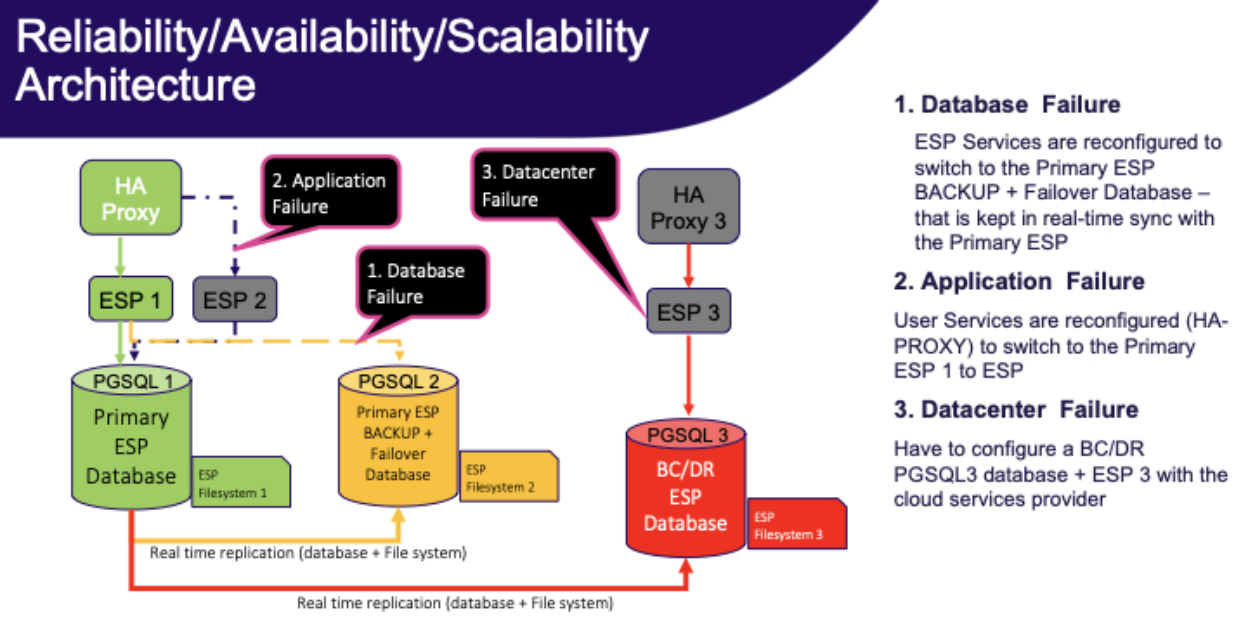
Definitions
Hot standby is a server that will automatically failover if the primary server fails.
Warm standby is a server that will not automatically failover and that may not have all the latest transactions.
Cold standby is a spare machine that needs to be turned on, backup restored (or even full staging of the machine).
Scenarios
Application failure
In the event of an ESP application server failure:
Hot standby: Two ESP application servers behind a load balancer.
Note
User-uploaded files and pipeline scripts/log files that are referenced by the database are written as physical files to disk and are not stored inside the database as blobs for a number of reasons, such as performance. You should take care to mount these directories to a networked storage solution, such as an AWS EFS filesystem.
Warm standby: Alternatively, you may cut traffic to another ESP application server of the same version, and sync the files in the ESP data volume using an out-of-band process, such as scheduled rsync. Using physical disks vs networked storage will increase file system performance and may reduce cost, but the file synchronization process will likely be eventually-consistent in nature.
Cold standby: For this scenario, in the event of a failure, you can quickly bootstrap a new ESP application server either by installing a tarball on a fresh Linux server. Alternatively, if you create an image (e.g. AWS AMI) for an installed server, you can create a new VM from this image or even automate the process by using an AWS ASG with the correct policy and health checks.
Database failure
In the event of a PostgreSQL database server failure:
Hot standby: The main use case for a hot standby is load balancing. You would use this to reduce to load on the database master server by delegating requests to one of more standby servers. To configure this, you must increase wal_level to hot_standby on the master database server and set hot_standby to on at the standby database servers. At a high level, most “clustered” PostgreSQL configurations can be considered hot standby, such as using more modern streaming replication modes.
Warm standby: You can transfer a PITR backup to a standby database server and set it to always run an endless recovery process using WAL logs from the master database server. In this configuration, the standby database server is not accepting queries and sharing the load, but can be made available in the event of a failure. To configure this, you must specify wal_level=replica; archive_mode=on on the master database server and set standby_mode to on at the standby database server(s). When using a hosted service such as AWS RDS, you can simply enable the “Multi-AZ deployment” option when provisioning your database server.
Cold standby: In this failure scenario, you would be configuring a new database server and restoring from backup. In AWS RDS, this would be equivalent to restoring a database instance from a snapshot.
Datacenter failure
In the event of a catastrophic datacenter (or regional, in cloud terms) failure:
Hot standby: To achieve this scenario, you must have duplicate infrastructure running in another datacenter or region, with database and file synchronization between these sites. There is a cost vs risk tradeoff to be made as this can cost up to double the price, whereas the likelihood of this event may not mandate automated failover at this level.
Warm standby: This is the same as a hot standby from a cost perspective as you would have duplicate infrastructure running, however you are failing over to the standby site by manually altering DNS records in the event of a failure.
Cold standby: In this failure scenario, you would have a spare machine or the ability to provision one, in another network. The ESP application would need to be installed and backups restored to make it functional, and DNS updated to direct traffic here afterwards. In AWS, you could spin up a copy of the ESP infrastructure in another region using existing IaC in the unlikely event that this scenario ever occurs.